
Get the app
In early access, and useful with no signal.
A record of your health that lives on your phone. Everything you log, reports you can hand to a doctor, and reminders that fire on time — all of it working before you have connected anybody.
- Android
- Android 8.0 or newer
- Installed directly
- While Glycoz is in early access
- Works offline
- After one sign-in
- iPhone
- Not yet
Not on Google Play yet. Early access, by request.
Glycoz is new, and while it is in early access the Android app is installed directly rather than from a store. Write to us and we will send it, with how to install it. Android will ask you to allow an app from outside the Play Store — that prompt is expected, and it is the only step that differs.
First run
What the first five minutes actually look like.
Written out because most health apps spend those five minutes asking for things, and the difference is the whole reason this one is worth installing.
- Install and open it
- A few short slides, then an account — which is what lets your records come back if you change or lose your phone. Creating one asks you to agree to the Terms of use and the Privacy policy, and to confirm your email address with a 6-digit code sent to it. Then your date of birth. Everything else on that form can be skipped.
- Pick what you want to record
- Asked once, when a new account is set up. 17 modules, a few of them always on; the rest start switched on, and anything you switch off stays off your home screen — the app is a log book you set up, not a dashboard somebody else designed. One screen about Glycoz Premium follows, and Continue goes straight past it.
- Record something
- It saves to the phone the moment you tap save, with no spinner and no connection. That is the normal path, not a fallback for when the network is poor.
- Connect a doctor, if you want one
- Optional, and the app never nags about it. Enter a code your doctor gave you, or look for one near you. Once you are connected they see every area until you switch one off, which you can do at any time.
What you get
Three screens from a real phone.
Captured from a build on an actual device, signed in to a demo account with records behind every number. Nothing here is a mock-up.
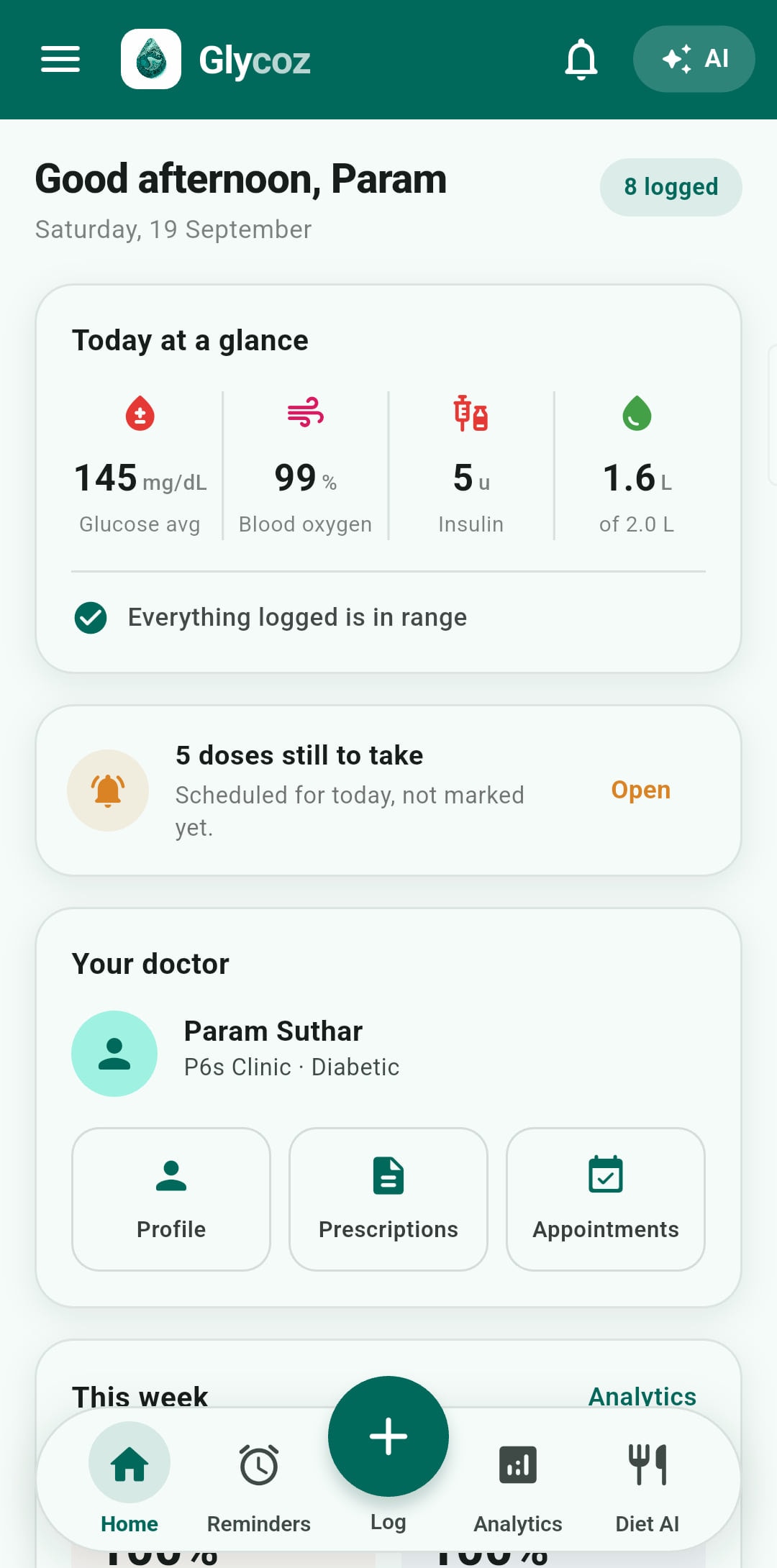
A module you switch off is gone from your home screen, not greyed out.
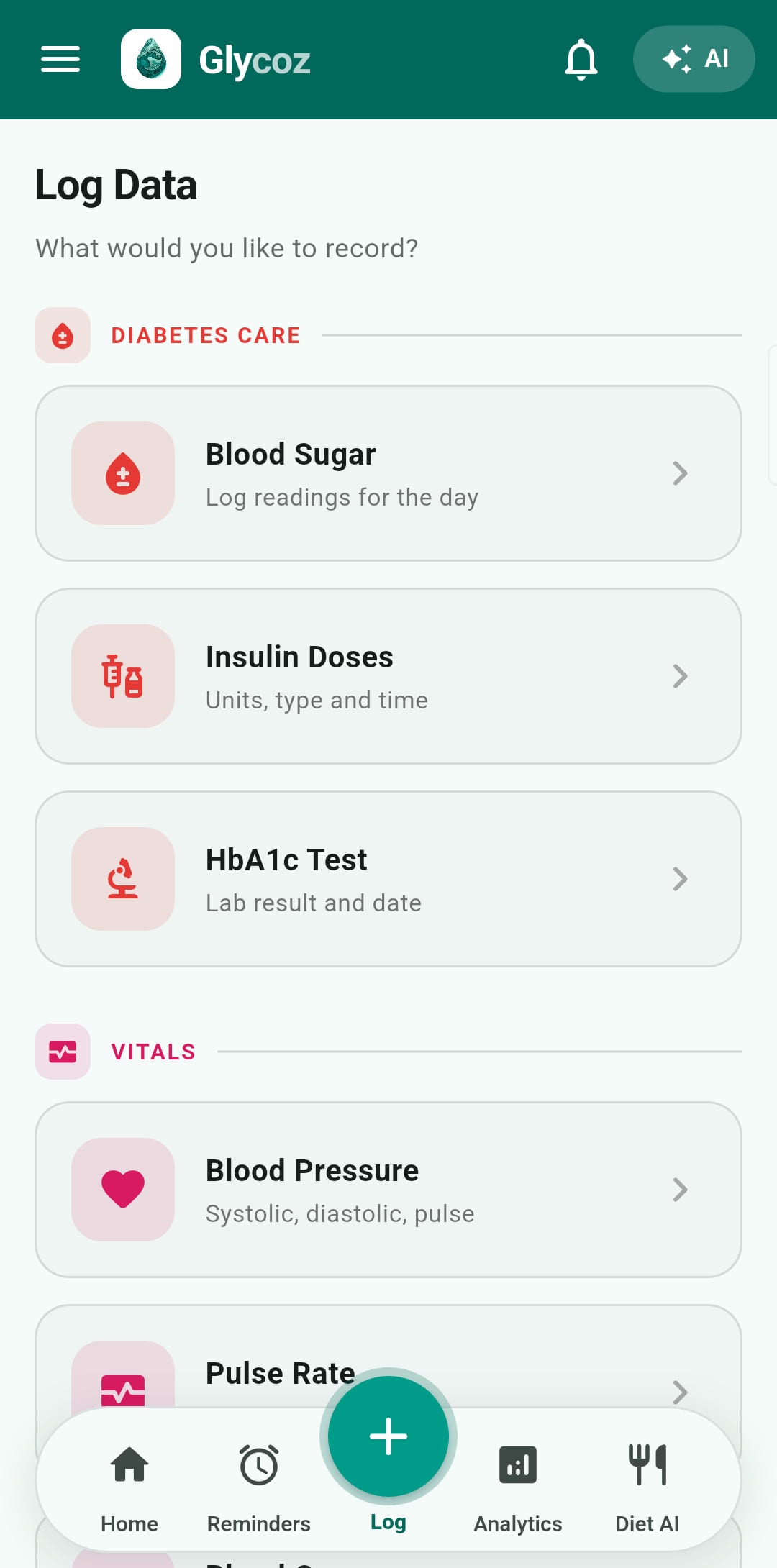
Recording anything is two taps from here, online or not.
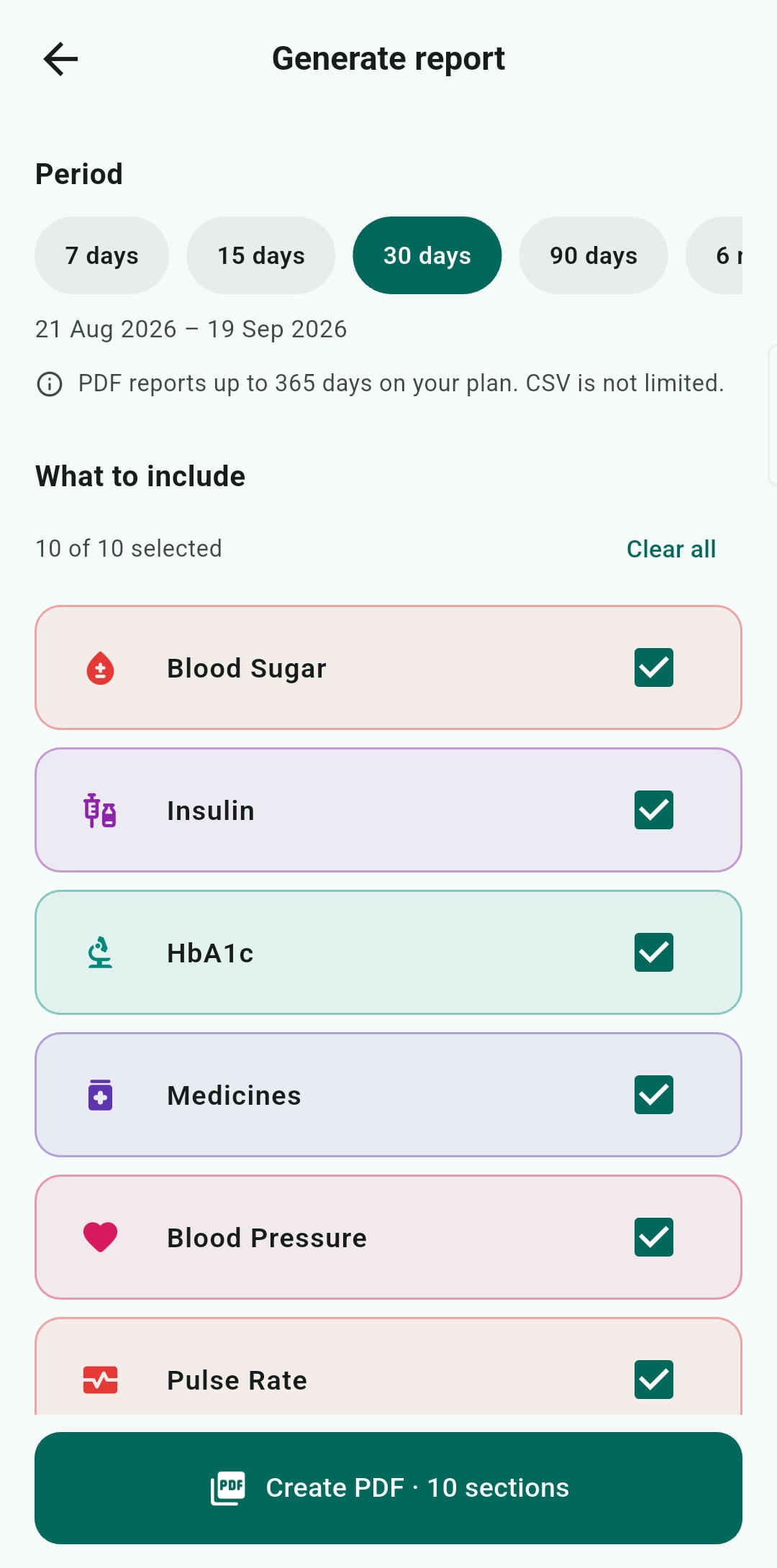
A report you can hand to a doctor, built from your own records.
Before you install
What it needs.
- Android
- Android 8.0 or newer. Built for mid-range hardware rather than flagships — the app does its work on the device, so it has to run well on the phone people actually own.
- Space
- Your records are text, and a year of daily logging adds very little. Reports and meal photographs are the only things that take real room, and both are yours to delete.
- An account
- Needed once, on first use. It is what makes the backup — and getting your history onto a new phone — possible. After that first sign-in the app works with no connection at all.
- Internet
- Needed to sign in and to sync, and for the things that involve somebody else: booking an appointment, an answer from the assistant, a meal estimate, an emergency alert. Not needed to record, edit, read your history, or be reminded about a medicine.
Permissions
What the app asks for, and why.
Named here rather than sprung on you at the prompt. A permission request you were not expecting is the point at which most people stop, and usually they were right to hesitate.
- Notifications
- So a reminder can appear at all. Without this, medicine and reading reminders cannot reach you.
- Exact alarms
- So a reminder fires at the time you set rather than whenever the system next feels like batching work. This is what makes a medicine alarm trustworthy.
- Run after restart
- So your reminders are re-armed when the phone reboots. Without it a restart silently cancels every alarm you set — which is the failure people have already had with other apps.
- Battery: unrestricted, if you agree
- When you start a walk or a ride, the app may ask to be left out of battery saving, because battery saving is what most often stops tracking while the phone is in a pocket. Saying no still records the session, just less reliably.
- Location, only for two things you start
- While a walk or ride you started is being tracked, to measure its distance and speed and draw its route on your phone. And once, if you ask Find a Doctor for doctors near you, to sort them by distance — choosing a city works instead. A route never leaves your phone; a search location is sent to sort the results and is not saved with your account.
- Camera, only for a meal
- When you photograph a meal for Diet AI. Location and camera details are removed from the photograph by the server as it arrives, before it is stored.
Glycoz does not ask for: your contacts, your microphone, your call log or your storage — a report goes out through Android’s own share sheet — and it never reads your location in the background of your day. If a future module needs anything else, it will be asked for at the point of use and explained here first.
What it costs
Free is the product, not the trial.
There is no countdown in the app, no feature that stops working after a month, and no advertising.
- Recording is free, on every module, with no limit on how much you log and no advertising anywhere in the app.
- Charts, reminders and a CSV of your records over any period are free, and so are PDF reports of up to 15 days. Analytics draws up to 15 days at a time without Premium — the same period a free report covers. Every reading you have taken is still there, and still listed in its own module.
- Connecting a doctor is free. So is disconnecting one, and so is raising an emergency alert.
- Glycoz Premium, a plan for patients, covers the assistant, meal estimates, longer PDF reports and longer periods in Analytics. Every account gets a few free tries first; after them, those need Premium, which you ask for in the app.
- Your doctor's practice pays for their panel. Nothing about their plan ever reaches your app — not a prompt, not a limit, not a message.
Once it is running
What happens to what you record.
Everything is written to a database on the phone the moment you save it. When you are online it syncs to your account as a backup. Nothing reaches a doctor until you connect one, and any area you switch off stops reaching them.
Questions
Before you install.
Why is it not on Google Play?
Is it free?
Will it work on my phone?
Does it work without internet?
Do I have to connect a doctor?
What if I change phones?
Is there an iPhone version?
Can I get my data out again?
Something not answered here?
Write to [email protected] or use the contact form. A person reads it.
Glycoz is a record-keeping and communication tool. It does not provide medical advice. It is not intended to be used as a medical device, and has not been assessed as one. If you have symptoms of a severe low or a severe high, treat it and get medical help. Do not open an app first.